Empowering Electric Vehicle Distribution: The Complete Digital App Suite for eBik
Transform electric vehicle sales, dealer ledgers, warranty activations, and territory service management with a unified digital app suite built for eBik.
System Functionality & Screen Workflows
Explore the end-to-end functionality across both the Dealer App and the multi-role Sales & Operations App.
eBik Dealer App
Designed for authorized eBik dealers to manage financial invoices, ledgers, vehicle activations, and warranty claims.
My Invoice
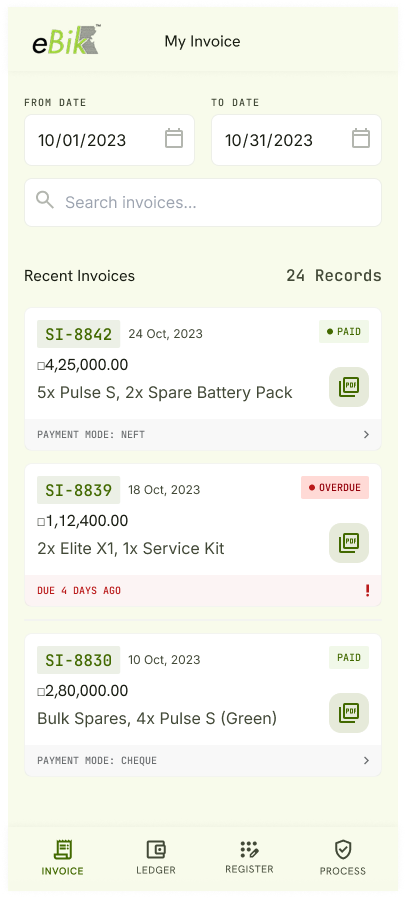
- SI List View: Chronological invoice list with recent transactions at the top. On clicking any invoice, the SI PDF is displayed.
- Payment & Status Indicators: Real-time status badges (e.g., Paid, Overdue), payment modes (NEFT, Cheque), and due date warnings (e.g., "DUE 4 DAYS AGO").
- Date Filter: Date range filter at the top to filter historical invoices.
My Ledger
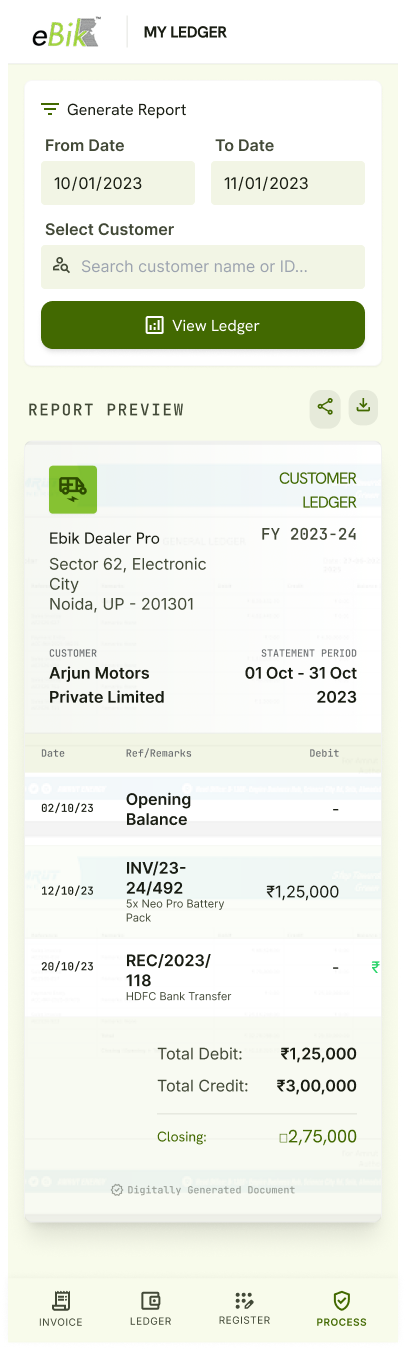
- Statement of Account: "From - To" date filter to view opening balance, debit entries, credit entries, and closing balance.
- Customer/Dealer Statement PDF: Generates and exports statement of account reports as downloadable PDFs directly from the app.
Register Warranty (Vehicle Activation)
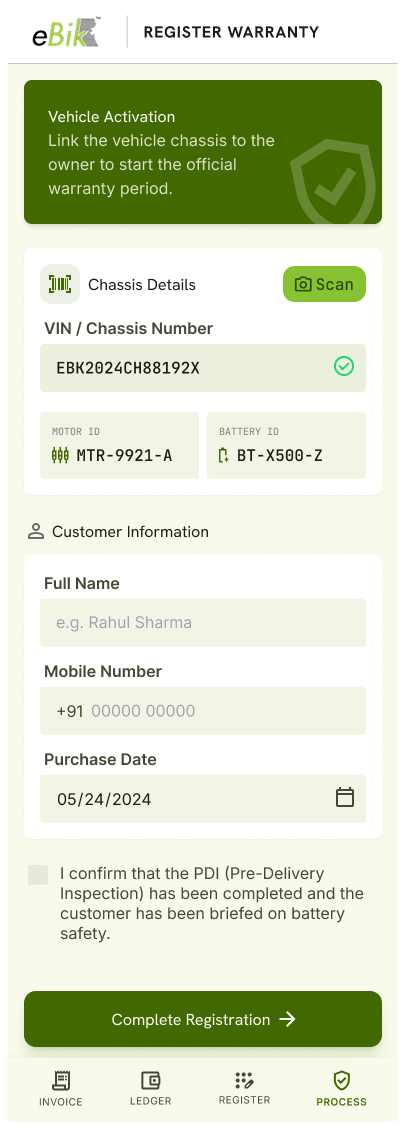
- Scan/Select Main Chassis: Scanning or entering the VIN/Chassis number automatically fetches the linked Motor ID (e.g., MTR-9921-A) and Battery ID (e.g., BT-X500-Z).
- Customer Onboarding: Enter customer full name, mobile number, and purchase date.
- PDI Confirmation: Mandatory checkbox confirming Pre-Delivery Inspection (PDI) completion and battery safety briefing.
- ERP Data Link: Automatically attaches customer details to the central ERP Serial No DocType.
Process Warranty
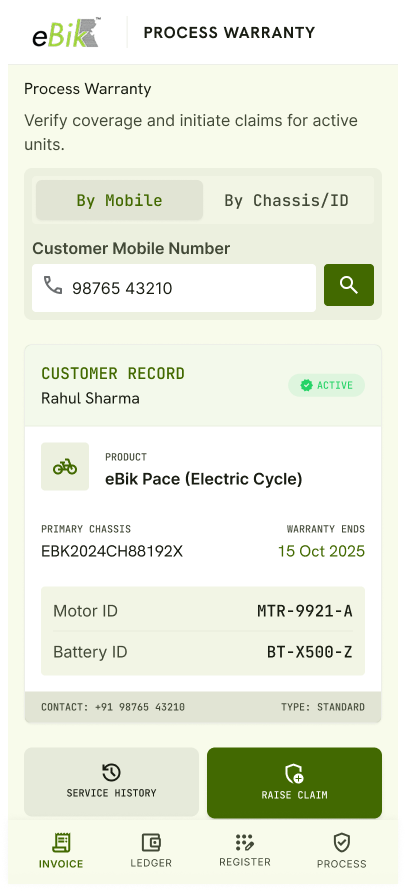
- Search by Mobile or Chassis: Enter customer mobile number to display all registered eBik products with active coverage status and warranty end date, OR enter Chassis ID to display connected chassis numbers and customer details.
- Component Verification: Displays linked Motor ID and Battery ID for physical verification during service visits.
- Action Buttons: View service history or trigger the "Raise Claim" process directly.
eBik Sales & Operations App
A multi-role mobile app tailored for Field Salespersons, Area Sales Managers (ASM), and Area Service Managers (ASM-Service).
ROLE I: Field Salesperson
a) Create Sales Invoice
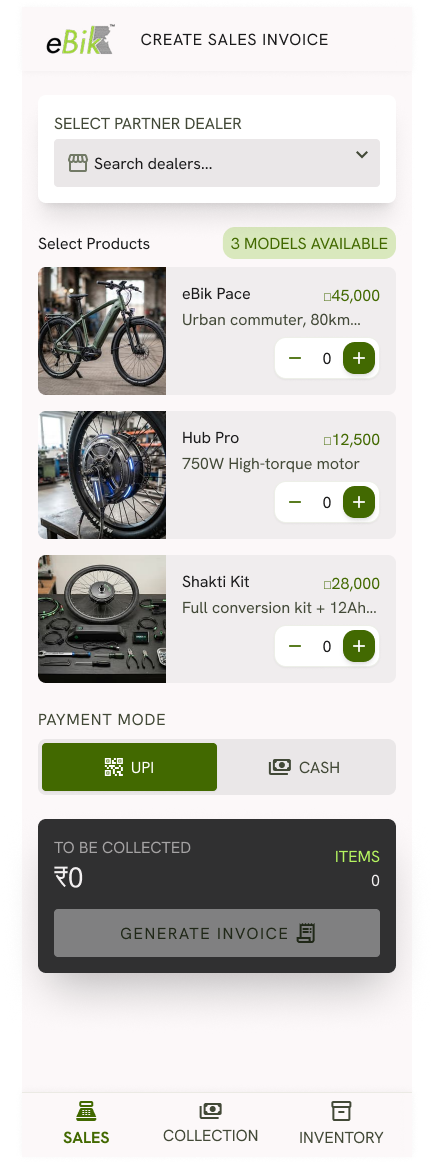
- Dealer & Product Selection: Select partner dealer, pick products (eBik Pace, Hub Pro motors, Shakti conversion kits), and set quantities.
- Payment Mode Selection: Choose between UPI (default) or Cash payment modes.
- Total Amount Calculation: Real-time display of total items and total amount to be collected with a single-tap "Generate Invoice" action button.
b) My Collection
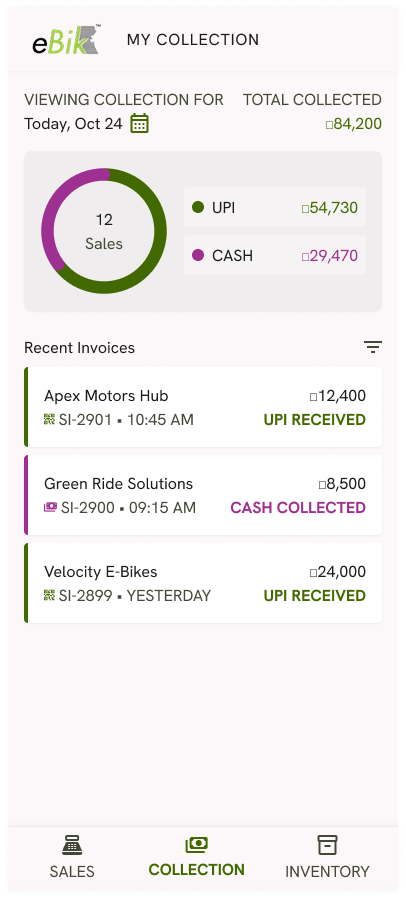
- Daily Revenue Tracking: Date picker to view daily sales collection totals.
- Payment Mode Breakdown: Visual donut chart splitting total collected amount into UPI and Cash.
- Recent Invoices List: Displays recent sales invoices with dealer name, timestamp, invoice number, amount, and payment status badge (e.g., UPI Received, Cash Collected).
c) My Inventory
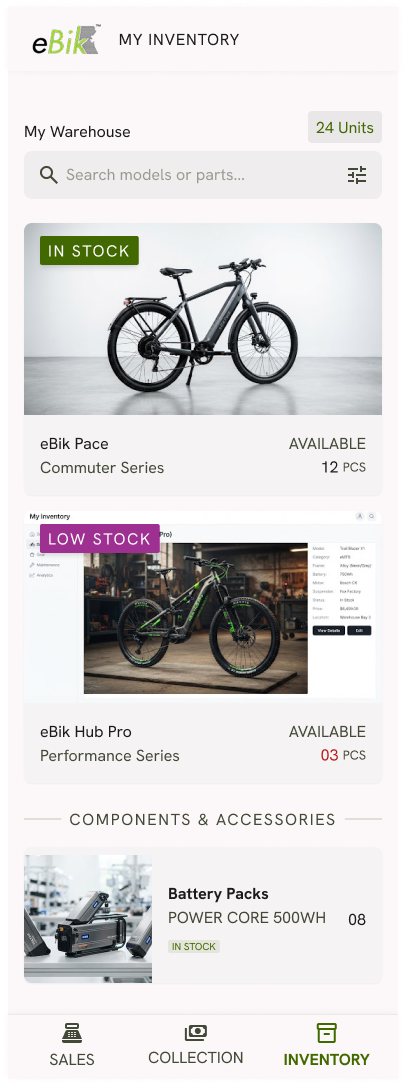
- Mobile Warehouse View: Shows all eBik models and spare components currently in the executive’s assigned mobile warehouse along with available quantities.
- Stock Badging: Visual status tags for "In Stock", "Low Stock", and component/accessory categorization.
ROLE II: Area Sales Manager (ASM)
a) My Dealers
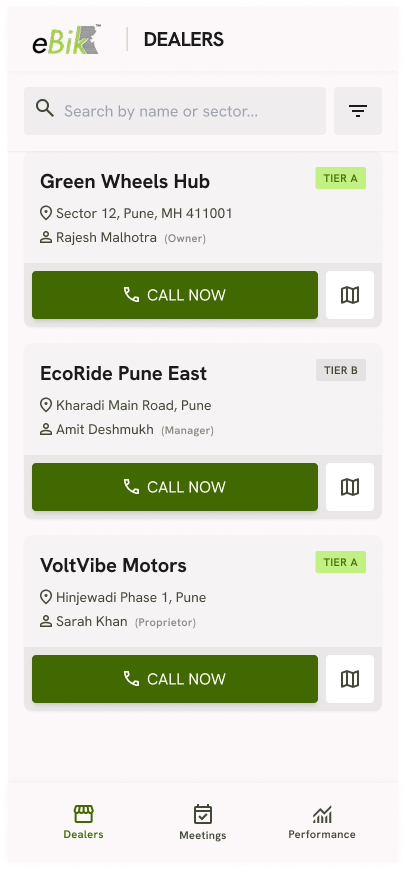
- Territory Dealer List: Displays all dealers in the assigned territory with address, tier classification (Tier A, Tier B), contact person name, one-touch call button, and location mapping.
b) My Meetings & Meeting Calendar
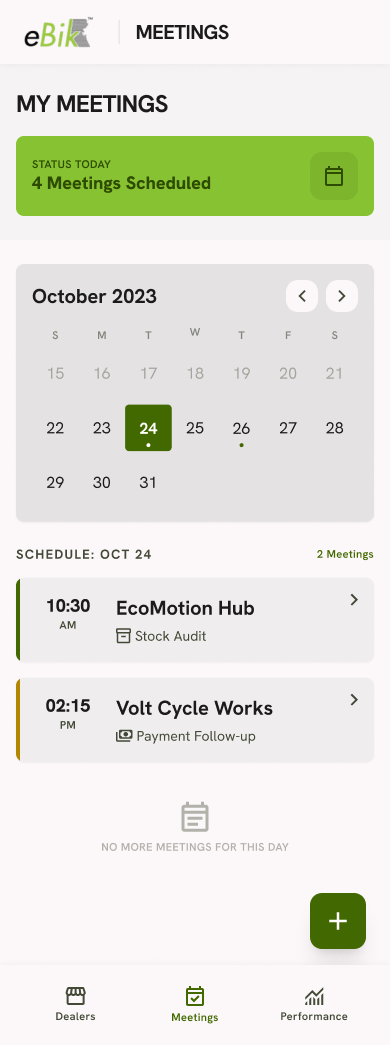
- Calendar View: Monthly calendar displaying green indicator dots on dates with scheduled meetings.
- Daily Meeting List: Clicking on any date shows the complete list of scheduled dealer meetings, meeting times, meeting types, and total count for that date at the top.
c) Create Meeting
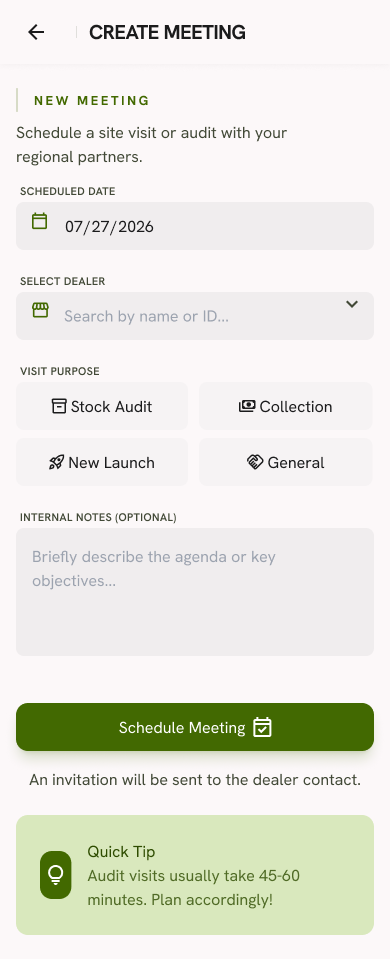
- Schedule Visit: Enter scheduled date (defaults to today), select partner dealer, select visit purpose (Stock Audit, Collection, New Launch, General), and add optional internal notes/agenda.
- Automated Invite: Sends an invitation directly to the dealer contact upon creation.
d) Dealer Sales Analysis
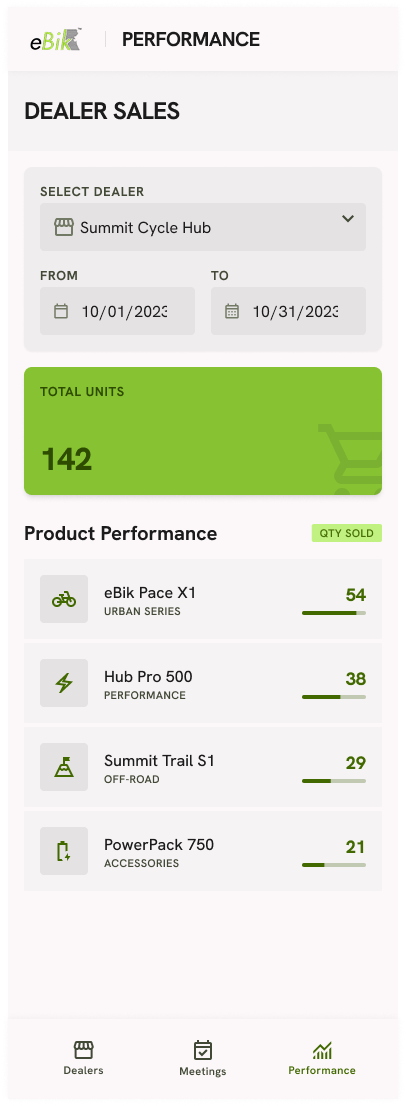
- Sales Analytics: Select dealer and date range to view item-wise sales volume and quantities sold to that specific dealer over time.
ROLE III: Area Service Manager (ASM - Service)
a) Check Warranty Claims Overview
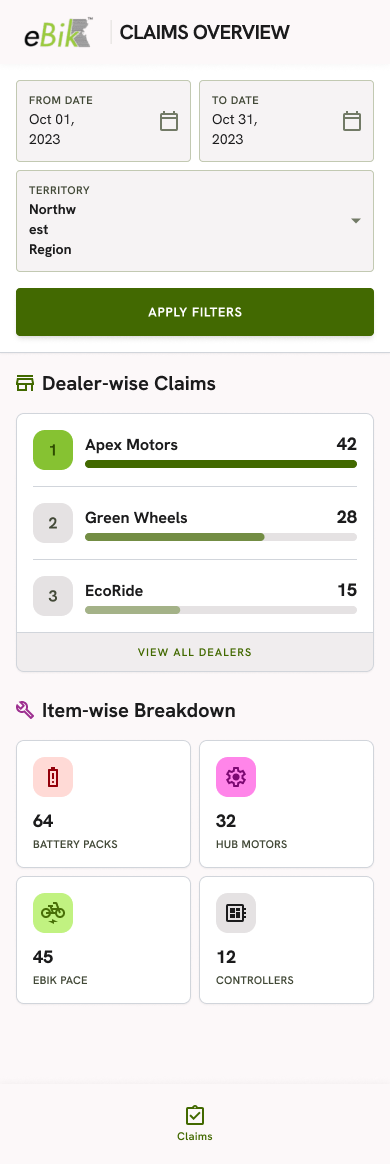
- Filters: Select date range ("From Date" - "To Date") and territory (e.g., Northwest Region) to apply filters.
- Dealer-Wise Claim Ranking: Shows total claim counts aggregated by dealer (e.g., Apex Motors: 42, Green Wheels: 28, EcoRide: 15).
- Item-Wise Claim Breakdown: Visual metric cards showing defect/claim counts grouped by component type (e.g., 64 Battery Packs, 32 Hub Motors, 45 Complete Vehicles, 12 Controllers).
Business Value
By deploying the Dealer App alongside the Sales & Operations App, eBik achieves major strategic advantages across its commercial supply chain:
- Financial Transparency & Frictionless Dealer Reconciliation: eBik dealers gain 24/7 visibility into invoices, ledgers, and payment statuses, eliminating administrative back-and-forth and accelerating credit clearances for new orders.
- Fraud Prevention & Digital Component-Level Warranty Binding: Automated linking of Motor ID and Battery ID during chassis registration prevents part swapping and fraudulent warranty claims while locking unalterable warranty start dates in the central ERP.
- Field Sales Acceleration & Real-Time Cash Visibility: Salespersons generate on-the-spot B2B invoices and collect UPI/Cash payments with zero delays, giving central finance real-time visibility into daily field cash flows and mobile warehouse inventory.
- Structured Channel Governance & Territory Audit Discipline: Area Sales Managers utilize calendar-based visit scheduling, meeting tracking, and dealer sales analytics to enforce audit compliance and drive dealer network revenue growth.
- Macro Quality Control & Optimized Service Logistics: Area Service Managers leverage dealer-wise and item-wise claim breakdowns to identify batch-level component defects early, safeguard against spurious warranty claims, and streamline regional spare parts supply.
Real-World Business Cases
Practical operational scenarios demonstrating how the eBik digital app suite resolves real-world challenges:
Case 1: Instant Dealer Credit Clearance for High-Demand Orders
Scenario: An eBik dealer needs an urgent weekend delivery of battery packs. Instead of waiting for corporate office hours to confirm balance details, the dealer checks their live app ledger, identifies a pending invoice, makes an immediate transfer, and secures instant order dispatch clearance.
Case 2: Vehicle Handover & Unalterable Digital Warranty Activation
Scenario: Upon selling an eBik Pace, the dealer scans the frame chassis VIN. The app automatically fetches Motor ID (MTR-9921-A) and Battery ID (BT-X500-Z). Upon entering customer details, the official warranty period is locked in the central ERP, sending an automated SMS receipt to the buyer.
Case 3: On-the-Go Field Invoicing & Digital Cash Capture
Scenario: A field sales executive delivers stock to "Apex Motors Hub". Using their mobile app, the executive checks live warehouse inventory, creates a ₹12,400 invoice, collects payment via a UPI QR code, and logs the collection. Central accounts receives verified payment logs instantaneously.
Case 4: Targeted Dealer Relationship Realignment
Scenario: An Area Sales Manager identifies a drop in orders from a Tier-A dealer. Using the calendar meeting manager, the manager schedules a "Stock Audit" visit, logs target agenda notes, meets the dealer, and uses real-time dealer sales reports during the meeting to realign order targets.
Case 5: Regional Defect Pattern Detection & Prevention
Scenario: The Area Service Manager reviews monthly claim metrics and notices an unexpected spike in battery pack replacements in a specific territory. Accessing component-level metrics, they trace the defect to a batch charger incompatibility, triggering an early recall before major financial losses occur.
Summary Matrix
| Application | User Role | Core Screen Functions | Primary Business Outcome |
|---|---|---|---|
| eBik Dealer App | Authorized Dealers | My Invoice, My Ledger, Register Warranty, Process Warranty | 100% financial clarity, instant warranty registration, zero manual paperwork. |
| eBik Sales App | Field Salesperson | Create Sales Invoice, My Collection, My Inventory | Faster B2B order billing, live cash/UPI tracking, live mobile stock visibility. |
| eBik Sales App | Area Sales Manager | My Dealers, My Meetings Calendar, Create Meeting, Dealer Sales | Structured dealer visits, audit accountability, territory sales performance. |
| eBik Sales App | Area Service Manager | Check Warranty Claims Dashboard (Dealer & Item-wise Breakdown) | Fraud prevention, early component defect detection, optimized spare parts supply. |
Developed on the enterprise-grade Frappe Framework, this app suite offers eBik complete scalability, seamless ERPNext integration, and unified digital governance across all sales, dealership, and service channels.

No comments yet. Login to start a new discussion Start a new discussion