Algerian Payment Integration
Appibase integration brings local payment support to Frappe LMS, enabling course payments in Algerian Dinar through a localized checkout.
The appibase_payments app is integrating Appibase, an Algerian payment gateway, directly with Frappe LMS. The integration is designed to provide a seamless payment experience while keeping the existing learner journey unchanged. Learners can continue to browse and enroll in courses as usual, with the Appibase payment available during checkout.
| Currency charged | Default checkout language | Webhook signature | Ways a payment gets confirmed |
|---|---|---|---|
| DZD | French (fr) | HMAC-SHA256 | 2 |
What we built
The app plugs into the payments framework Frappe LMS already uses — the same slot Stripe, Razorpay and PayPal hook into. Once it's installed and configured, Appibase simply shows up as a normal payment gateway option.
- An Appibase Settings screen where a Client ID, API URL and webhook secret are entered once.
- Automatic registration as a payment gateway the moment those settings are saved — no code changes, no redeploy.
- Prices sent to Appibase in Algerian Dinar, on a hosted checkout page that defaults to French.
How a payment happens
- Learner checks out — they click pay on a course or batch, right inside the LMS.
- Asks for a checkout link — the site authenticates with Appibase using a short-lived access token, then requests a one-time checkout session for that exact price.
- Learner pays on Appibase — they're redirected to Appibase's own secure page and pay in DZD; card details never touch the GreyCube site.
- The payment gets confirmed — instantly, or via a scheduler fallback if there's a network issue (see below).
- Enrollment happens automatically — the instant the payment is confirmed, the learner is enrolled. No manual step, no admin in the loop.
How a payment gets confirmed
Appibase checks for a successful payment right away. If there's a network issue and that confirmation doesn't come through, a scheduler picks it up automatically and fetches the payment status instead — so a payment is never lost, just confirmed a little later.
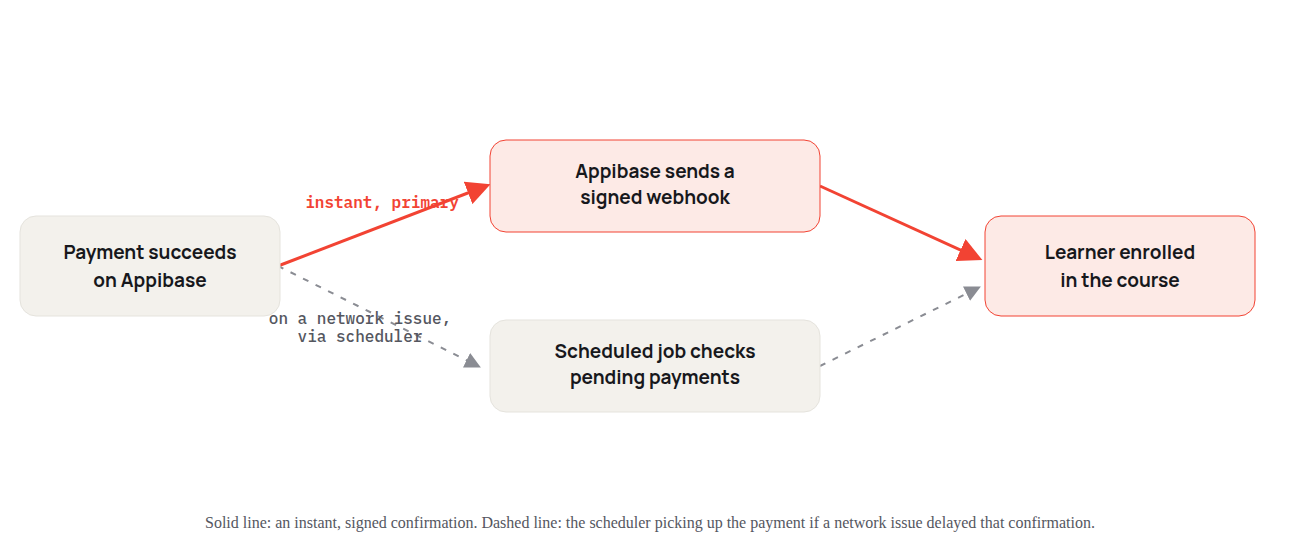
- Instant check — Appibase signals success as soon as the payment completes, and the learner is enrolled immediately.
- Scheduler fallback — if a network issue gets in the way, a scheduled job fetches the payment status on its own and confirms it automatically.
Security, by default
- Every webhook is signed with HMAC-SHA256 and a timestamp. A request that's signed incorrectly, or more than five minutes old, is rejected outright.
- All calls to Appibase's API use short-lived OAuth2 tokens — no long-lived password sits inside the integration.
- A payment can't be recorded twice — a retried webhook or an overlapping reconciliation pass can't double-enroll or double-charge a learner.
Instant when the network cooperates, self-healing when it doesn't — that's the whole design brief.
Getting started
Turning it on is a three-field setup: an Appibase Client ID, the Appibase API URL, and a webhook secret, entered once on the Appibase Settings page. Save it, and Appibase appears automatically as a payment option for every paid course or batch — DZD pricing, French checkout, and both confirmation checks included.
No comments yet. Login to start a new discussion Start a new discussion