WhatsApp Based Frappe Helpdesk: Simplifying Customer Support Through WhatsApp
Simplify customer support with WhatsApp-based Frappe Helpdesk. Customers can create new tickets, update existing tickets, and receive agent replies directly on WhatsApp.
Customer support is most effective when it is simple, accessible, and easy to continue. Since WhatsApp is already a familiar communication channel for millions of customers, businesses can make support more convenient by connecting WhatsApp directly with their Helpdesk.
With a WhatsApp-based Frappe Helpdesk, customers can create new support tickets, update existing tickets, and receive responses from support agents without leaving WhatsApp.
A Simple Support Experience
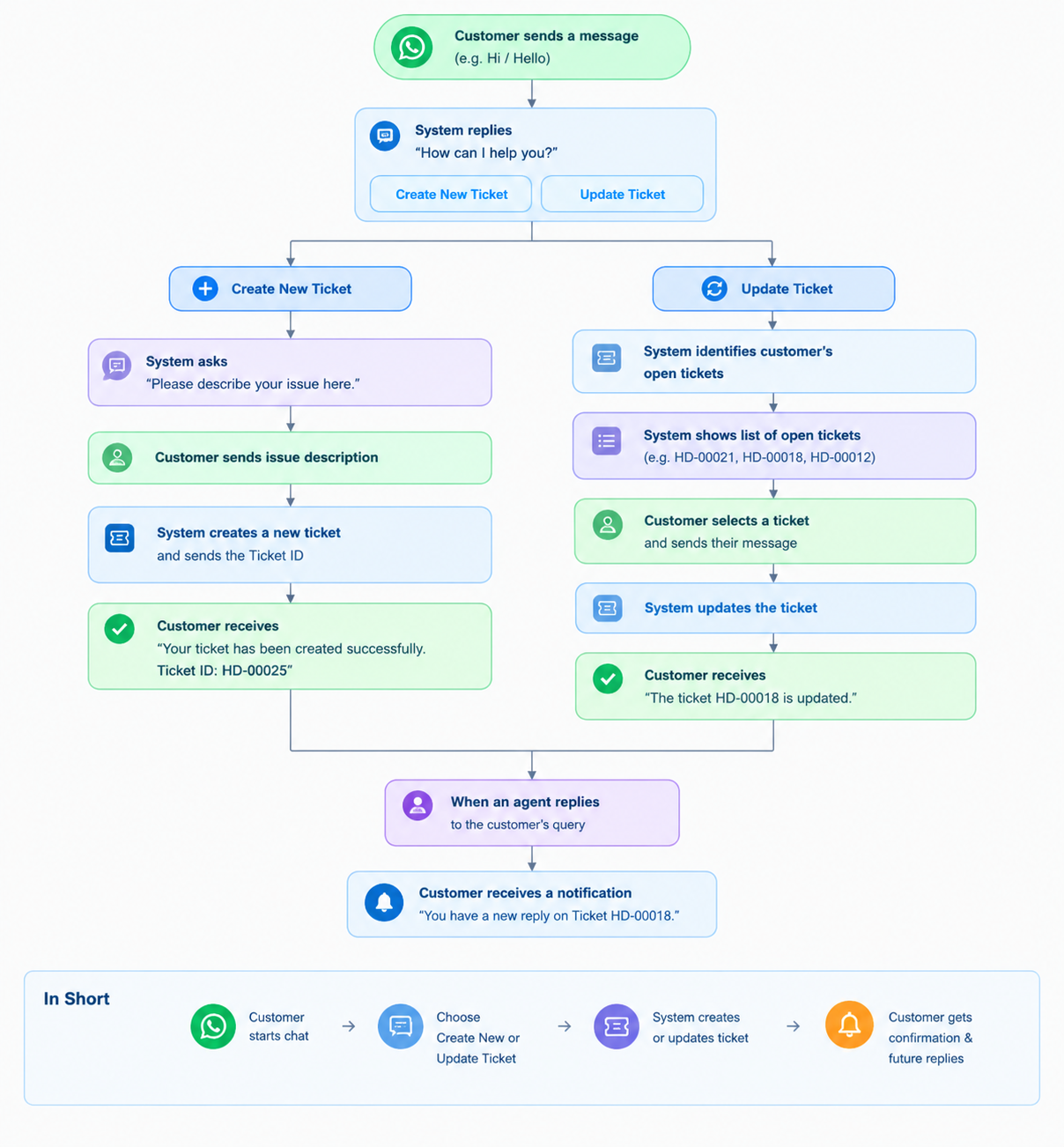
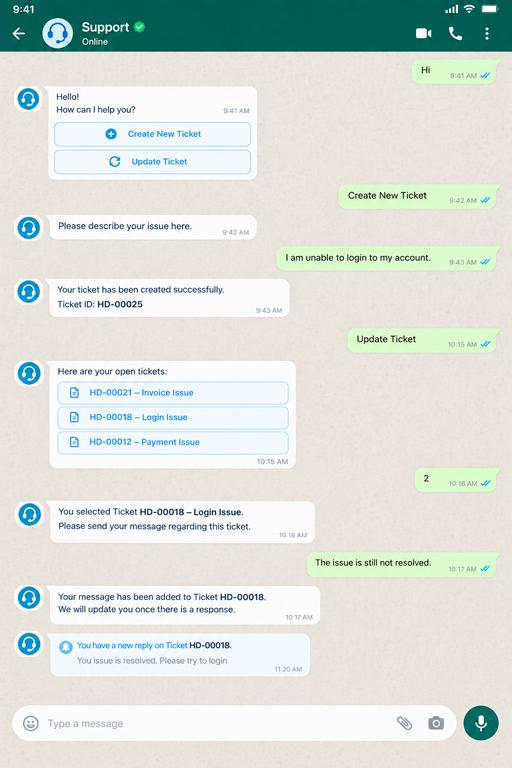
The process starts as soon as a customer sends a message to the support number. The system identify the customer using number and responds with a simple question: "How can I help you?"
The customer is then provided with two options:
- Create New Ticket
- Update Ticket
This keeps the interaction simple and allows the customer to choose what they need without navigating through a separate support portal.
Creating a New Ticket
When a customer chooses to create a new ticket, they are asked to describe their issue.
Once the issue is submitted, the system creates a Helpdesk ticket and sends the ticket ID back to the customer through WhatsApp.
This gives the customer immediate confirmation that their request has been received and provides them with a reference for future communication.
Updating an Existing Ticket
Customers can also continue an existing support request directly through WhatsApp.
When Update Ticket is selected, the system identifies the customer's open tickets and displays them as selectable options. The customer can simply choose the relevant ticket and send their message.
The message is then added to the selected ticket, and the customer receives a confirmation that the ticket has been updated.
This eliminates the need for customers to search for or manually enter ticket numbers.
Stay Updated When an Agent Replies
The communication does not stop after a ticket is created or updated.
When a support agent responds to a customer's query, the customer receives a WhatsApp notification informing them that there is a new reply on their ticket.
This creates a complete two-way support experience:
Customer → WhatsApp → Helpdesk → Support Agent → WhatsApp → Customer
Customers can therefore stay informed without repeatedly checking the Helpdesk portal.
Why WhatsApp-Based Helpdesk?
- Familiar Communication Channel: Customers can use a platform they already know instead of learning a new support system.
- Faster Ticket Management: Creating and updating tickets becomes as simple as sending a WhatsApp message.
- Better Customer Experience: Clear options and automatic responses make the support process easier to understand and use.
- Centralized Support: All customer requests and conversations remain connected to the Helpdesk, giving support teams a clear view of the issue and its history.
- Continuous Communication: Customers can receive updates and agent responses directly through WhatsApp, keeping the conversation active from start to finish.
No comments yet. Login to start a new discussion Start a new discussion